Why Is My Computer Running Slow? Common Causes and Easy Fixes
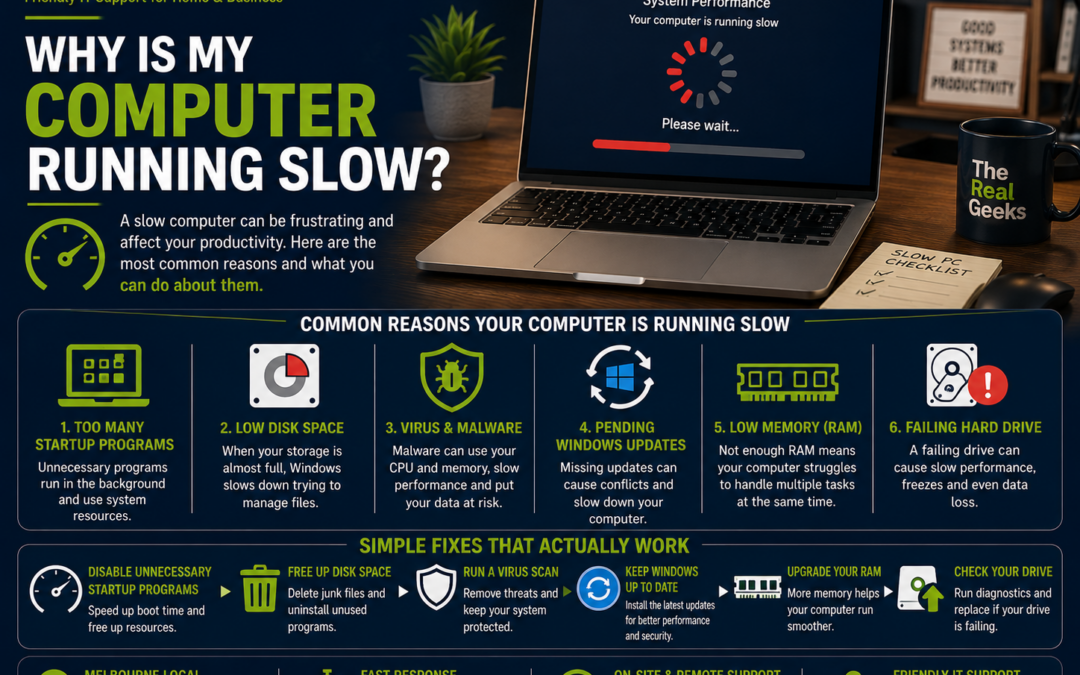
Has your computer become frustratingly slow? Maybe it takes several minutes to start, programs freeze, websites load slowly, or everything feels sluggish.
A slow computer doesn't always mean it's time to buy a new one. In many cases, the problem can be fixed with a few simple steps. In this guide, we'll explain the most common reasons why computers slow down and what you can do to get them running faster again.
1. Too Many Programs Start Automatically
Many applications automatically launch every time you turn on your computer.
Over time, this can significantly increase startup times and reduce overall performance.
How to fix it:
-
Disable unnecessary startup programs.
-
Keep only essential applications running when Windows starts.
-
Restart your computer after making changes.
A cleaner startup often makes your computer feel much faster.
2. Your Hard Drive Is Almost Full
Computers need free storage space to operate efficiently.
If your drive is nearly full, Windows has less room to work, causing slower performance.
How to fix it:
-
Delete unnecessary files.
-
Empty the Recycle Bin.
-
Remove old downloads.
-
Uninstall programs you no longer use.
-
Move large files to cloud storage or an external drive.
Aim to keep at least 15–20% of your storage free.
3. You're Still Using a Traditional Hard Drive (HDD)
If your computer still uses a traditional hard disk drive (HDD), it's likely one of the biggest reasons it's slow.
Replacing an HDD with a Solid State Drive (SSD) can dramatically improve:
-
Startup speed
-
Program loading times
-
File transfers
-
Overall responsiveness
For many older computers, an SSD upgrade delivers one of the biggest performance improvements.
4. Too Many Browser Tabs
Modern web browsers use a surprising amount of memory.
Having dozens of tabs open can slow down even powerful computers.
Try this:
-
Close tabs you're no longer using.
-
Remove unnecessary browser extensions.
-
Restart your browser occasionally.
-
Clear your browsing cache.
A lighter browser uses fewer system resources.
5. Your Computer Needs Updates
Software updates don't just add new features—they also improve security, stability, and performance.
Make sure you're regularly updating:
-
Windows
-
macOS
-
Web browsers
-
Microsoft 365
-
Drivers
-
Security software
Keeping everything up to date helps your computer run more smoothly.
6. Malware or Viruses
Malware can consume system resources without you even knowing it's there.
Warning signs include:
-
Frequent pop-up advertisements
-
Slow performance
-
Unexpected crashes
-
High CPU usage
-
Unknown programs appearing
How to fix it:
-
Run a full antivirus scan.
-
Remove suspicious software.
-
Keep your security software updated.
-
Avoid downloading files from unknown websites.
7. Not Enough Memory (RAM)
If you regularly have multiple programs open, your computer may simply need more memory.
Symptoms include:
-
Programs freezing
-
Slow switching between applications
-
Browser crashes
-
Long loading times
Adding more RAM can significantly improve multitasking performance.
8. Your Computer Hasn't Been Restarted
Many people leave their computers running for weeks.
Restarting clears temporary files, refreshes memory, and installs updates.
If your computer has been running continuously, a simple restart may improve performance.
9. Dust and Overheating
Dust buildup inside your computer can restrict airflow and cause components to overheat.
When this happens, the computer may automatically slow itself down to protect the hardware.
Signs include:
-
Loud fans
-
Excessive heat
-
Sudden shutdowns
-
Poor performance
Cleaning the internal components can help improve cooling and restore performance.
10. Too Many Background Programs
Some software continues running even after you've closed it.
These background applications use valuable system resources.
Examples include:
-
Cloud storage sync tools
-
Chat applications
-
Printer software
-
Update utilities
-
Media players
Closing unnecessary background programs can free up memory and processing power.
11. Your Computer Is Getting Old
Technology improves every year.
If your computer is more than six or seven years old, it may struggle with modern software and websites.
Before replacing it, consider:
-
Installing an SSD.
-
Upgrading RAM.
-
Performing a clean Windows installation.
-
Removing unnecessary software.
These upgrades can often extend the life of your computer.
Simple Ways to Speed Up Your Computer
Here are a few easy habits that help keep your computer running well:
-
Restart your computer regularly.
-
Install updates promptly.
-
Delete files you no longer need.
-
Uninstall unused software.
-
Keep your antivirus software updated.
-
Limit the number of startup programs.
-
Back up important files regularly.
Routine maintenance can make a noticeable difference.
When Should You Call an IT Professional?
If your computer is still slow after trying these steps, the problem may involve:
-
Failing hardware
-
A damaged SSD or hard drive
-
Faulty RAM
-
Driver conflicts
-
Malware infections
-
Windows corruption
A professional diagnosis can identify the issue quickly and recommend the most cost-effective solution.
Why Choose The Real Geeks?
At The Real Geeks, we help homeowners and small businesses across Melbourne keep their computers running at their best.
Our services include:
-
Computer health checks
-
Performance optimisation
-
SSD upgrades
-
RAM upgrades
-
Virus and malware removal
-
Windows troubleshooting
-
Microsoft 365 support
-
Data backup solutions
-
New computer setup
-
Remote and onsite IT support
Whether your computer is slowing down or won't start at all, we're here to help.
Final Thoughts
A slow computer doesn't always mean it's time to replace it. Many performance issues are caused by outdated hardware, unnecessary software, lack of maintenance, or simple configuration problems.
With a few upgrades and regular maintenance, you can often restore your computer's speed and extend its life by several years.
Need Help Speeding Up Your Computer?
If your computer is taking forever to load, constantly freezing, or simply isn't performing like it used to, The Real Geeks can help.
We'll identify the cause, recommend the best solution, and get your computer running smoothly again.
📞 Call us today on 0405 350 248 for friendly onsite or remote IT support across Melbourne.