Signs Your Computer Has a Virus (And What to Do Next)
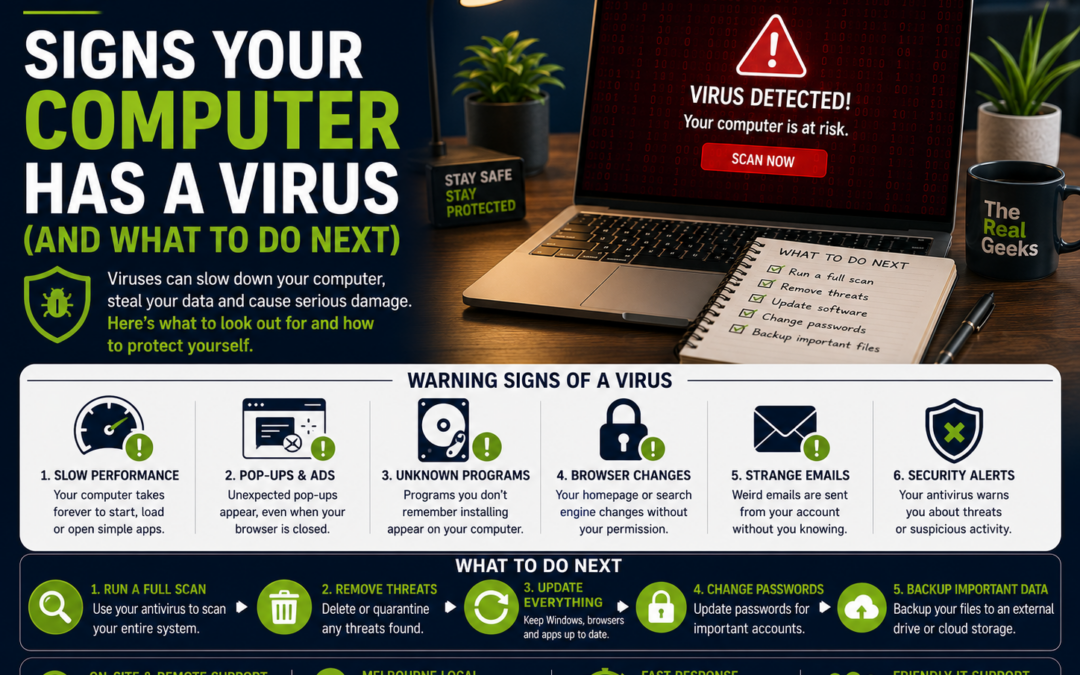
Signs your computer has a virus aren't always obvious. Sometimes your PC becomes unusually slow, strange pop-ups appear, programs crash, or your browser starts redirecting you to websites you've never visited. These warning signs can indicate that your computer has been infected with malware or a virus.
At The Real Geeks, we regularly help homeowners and small businesses across Melbourne remove viruses, recover infected computers, and improve their overall cybersecurity. In many cases, customers ignore the early warning signs, only seeking help once the computer becomes almost unusable.
The good news is that recognising the signs your computer has a virus early can help minimise damage and protect your personal information.
In this guide, we'll explain the most common symptoms of a virus, what causes computer infections, and the steps you should take immediately if you suspect your computer has been compromised.
What Is a Computer Virus?
A computer virus is a type of malicious software (malware) designed to damage your computer, steal personal information, slow down your system, or give cybercriminals unauthorised access to your device.
Modern malware can:
- Steal passwords
- Record keystrokes
- Encrypt files (ransomware)
- Display fake security alerts
- Install unwanted software
- Hijack your browser
- Spy on your online activity
- Steal banking information
Some infections remain hidden for weeks or even months before they become obvious.
10 Signs Your Computer Has a Virus
1. Your Computer Has Suddenly Become Slow
One of the most common signs your computer has a virus is poor performance.
If your computer previously worked well but now:
- Takes several minutes to start
- Opens programs slowly
- Frequently freezes
- Constantly shows the spinning loading icon
Malware may be running in the background and using valuable system resources.
2. Pop-Up Ads Keep Appearing
Do you see advertisements even when your web browser is closed?
Unexpected pop-ups often indicate:
- Adware
- Browser hijackers
- Potentially unwanted programs (PUPs)
Legitimate websites should never bombard your desktop with random advertising.
3. Your Browser Homepage Keeps Changing
If your browser suddenly opens to a search engine or website you've never selected, malware may have modified your settings.
Other signs include:
- Unknown toolbars
- New browser extensions
- Search results being redirected
- Fake search engines
4. Antivirus Software Stops Working
Many viruses attempt to disable your security software first.
Warning signs include:
- Antivirus won't open
- Protection has been turned off
- Updates fail
- Security software disappears completely
This makes it easier for malware to spread across your computer.
5. Programs Crash Frequently
Random crashes are another warning sign.
Examples include:
- Programs closing unexpectedly
- Blue screen errors
- Files refusing to open
- Windows Explorer repeatedly restarting
While hardware faults can also cause crashes, malware should always be considered as a possibility.
6. Your Computer Is Constantly Busy
Is your hard drive or SSD light always flashing?
Does the cooling fan run loudly even when you're doing very little?
Hidden malware often uses:
- CPU power
- Memory (RAM)
- Internet bandwidth
This results in constant background activity.
7. Strange Emails Are Being Sent
Friends or colleagues may tell you they've received strange emails from your account.
Many viruses spread by:
- Sending spam
- Sharing infected attachments
- Sending phishing links
If this happens, immediately change your passwords and scan your computer.
8. Unknown Programs Have Appeared
Notice software you don't remember installing?
Examples include:
- Fake antivirus programs
- Browser toolbars
- Shopping assistants
- Random games
- Unknown utilities
Never ignore unfamiliar software appearing on your computer.
9. Your Files Have Been Encrypted
If your documents suddenly:
- Won't open
- Have strange file extensions
- Display ransom notes
- Ask for payment
You may have been infected with ransomware.
Disconnect your computer from the internet immediately and seek professional help.
10. High Internet Usage
Viruses often communicate with remote servers.
If your internet seems unusually slow—even when you're not downloading anything—malware could be uploading stolen information or downloading additional threats.
How Do Computers Get Viruses?
Most infections happen because users unknowingly install malicious software.
Common causes include:
- Opening suspicious email attachments
- Clicking fake links
- Downloading cracked software
- Visiting unsafe websites
- Installing fake browser extensions
- Connecting infected USB drives
- Ignoring software updates
Fortunately, many infections can be avoided with good online habits.
What Should You Do If You Think Your Computer Has a Virus?
If you notice the signs your computer has a virus, don't panic.
Follow these steps:
Disconnect from the Internet
This may stop malware from spreading or communicating with attackers.
Run a Full Antivirus Scan
Use reputable antivirus software to perform a complete system scan.
Update Windows
Security updates often fix vulnerabilities that malware exploits.
Change Important Passwords
Update passwords for:
- Banking
- Microsoft accounts
- Social media
- Shopping websites
Use a different device if possible.
Back Up Important Files
If your files are still accessible, create a backup before making major changes.
Seek Professional Help
Some infections cannot be removed safely without specialised tools.
Professional virus removal can ensure your computer is completely clean.
How to Prevent Computer Viruses
Prevention is always better than recovery.
Here are some simple habits:
- Keep Windows updated.
- Install trusted antivirus software.
- Use strong passwords.
- Enable Multi-Factor Authentication (MFA).
- Back up your important files.
- Don't click suspicious links.
- Avoid downloading pirated software.
- Only install apps from trusted sources.
These simple steps dramatically reduce your risk.
How The Real Geeks Can Help
At The Real Geeks, we help homeowners and small businesses remove viruses, recover infected computers, and improve cybersecurity.
Our services include:
- Virus and malware removal
- Computer health checks
- Antivirus installation
- Windows optimisation
- Data recovery assistance
- Secure backup solutions
- Home and business IT support
- Remote and on-site support
Whether your computer is infected or you'd simply like peace of mind, we're here to help.
Final Thoughts
Recognising the signs your computer has a virus early can save you from losing important files, exposing sensitive information, or paying for costly repairs.
If your computer is running unusually slow, displaying unexpected pop-ups, crashing regularly, or behaving strangely, don't ignore the warning signs. Acting quickly can prevent further damage and help restore your computer before the problem becomes more serious.
At The Real Geeks, we provide friendly, reliable IT support to help keep your devices secure, fast, and running smoothly. If you suspect your computer has a virus, contact us today for expert assistance and peace of mind.